Vacation rental accounting, from the booking to the books
For property owners, property managers and service providers. Revenue comes straight from your bookings, owner statements come out of the same books, and the numbers you send owners match what your accountant sees. Hold owner money? Every month VacayOps checks that your bank, your books and what you owe owners agree.
Accounting is part of the subscription — no add-on fee for trust accounting, owner statements, accountant access or the 1099 files.
September close
Illustration · fictional portfolio- 1BookingsRevenue counts at check-inPosted
- 2Month closePer property and channelClosed
- 3Owner statementsReviewed, then issuedIssued
- 4Owner payoutsPaid from your bank, recorded hereRecorded
- 5Three-way reconciliationBank = books = what you holdSigned
- 6Your accountantRead-only access · 1099 filesReady
Books for each of the three audiences
Property owners, property managers and vacation rental service providers keep their books in the same system they run the work in — each with what their business needs.
Property Owners
Your own books: what your rentals earned, what they cost, lodging tax, and a Year-End Tax Pack for your accountant. No trust accounting — the money is your own. Property Owner plan.
Property Managers
The full money cycle: month-end close, owner statements, trust accounting with three-way reconciliation, invoices and bills, accountant access and 1099 files for owners and contractors. Full Platform.
Vacation Rental Service Providers
Invoices, bills, a ledger and a Business Tax Summary — income by service, costs by category and your 1099-NEC payees for the year. Operations Only.
Owner statements that tie to the books
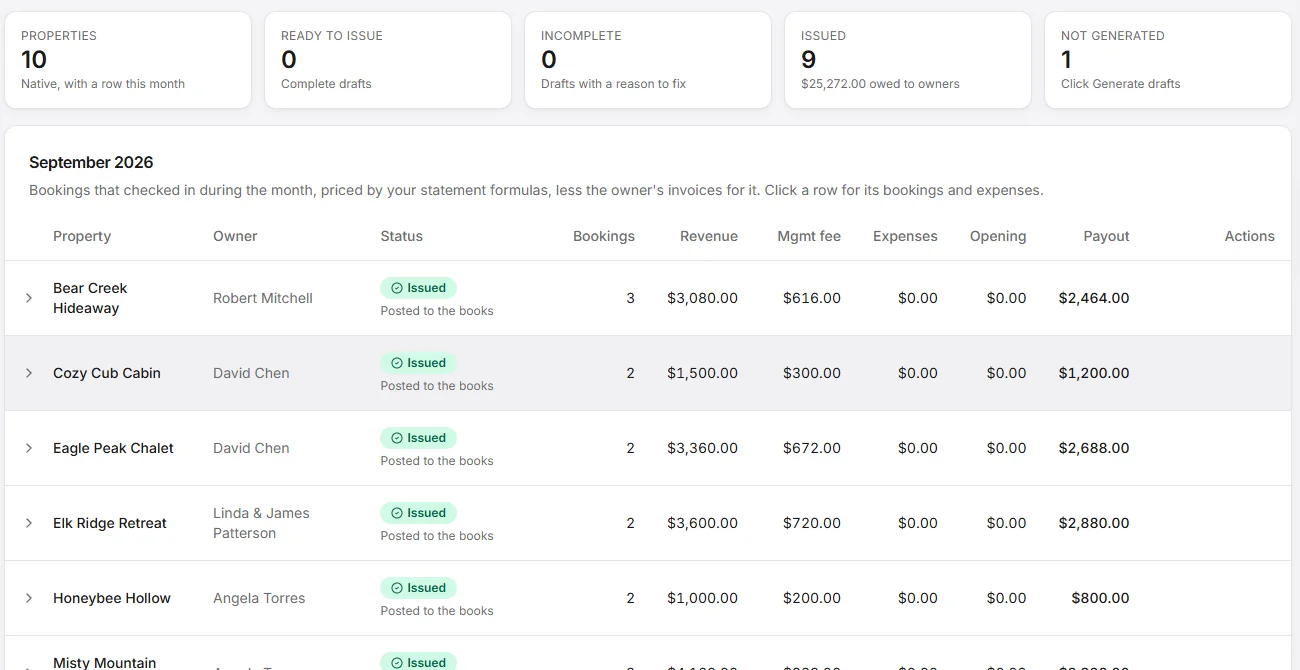
Generate a month of drafts, mark each one reviewed — who and when is recorded — then issue them one at a time or with “Issue all ready”. The owner’s share on each statement is the same number your books show, so statements and your profit and loss never disagree.
- An incomplete draft says why, and can only be issued with an explicit “issue anyway”
- A late change becomes “Adjustment 1” for the difference — the issued statement is never rewritten
- Lodging tax the owner files themselves is paid to them as its own line, never part of your fee base
- Refunds counted in the month appear as their own line: the owner’s share given back, the fee given back
- Invoices deducted on the statement are guarded: a part-paid invoice isn’t deducted, and a settled one can’t be paid twice
- A PDF per statement, “Download all PDFs” for the month, and a summary CSV — drafts carry a DRAFT stamp
Statements in your layout — frozen when issued
Set the titles, intro and footer text, which sections and booking columns show and in what order, invoices itemized or as one total, fees and taxes separate or combined, and what the summary rows are called. One default layout, plus per-property layouts, with a live preview.
- The layout is frozen onto each statement when it is issued, so an old statement always reprints the same
- The PDF carries your own logo when branding is on
- Owners see the statement in the portal in the same layout as the PDF
Layout · Lakeside properties
Live previewAugust statement issued
Layout frozen onto the statement — it reprints exactly the same next year.
Trust accounting with three-way reconciliation
For property managers who hold owner and guest money, trust accounting runs on the same bookings and statements. Each month a three-way reconciliation your accountant can sign off checks that the bank statement, the trust cash in your books, and what you hold for owners and guests agree.
- A separate trust bank account (segregated), or one bank account with owner and guest money tracked separately from yours (advisory)
- Guest payments recorded into trust automatically; issued statements build each owner’s balance
- Owner payouts recorded once, never twice — paid from your own bank
- Schedules by owner and by property, and a reconciliation PDF with sign-off lines
- Plain-language checks for shortfalls, negative balances and money without an owner
Trust reconciliation · September
Balanced · signed1 · Bank
$46,500.00
2 · Books
$46,500.00
3 · What you hold
$46,500.00
Example figures. Signing freezes the month; the PDF carries the worksheet, the schedules by property and by owner, and the sign-off lines.
Co-owners, mid-month sales and the paperwork that follows
Properties change hands and are owned by more than one person. Statements, balances and the 1099 follow the ownership, not the other way round.
- List co-owners with a percentage each; the primary owner holds the rest, and each statement freezes the split
- Each co-owner is credited their share in the books, sees “Your payout (n% share)” in the portal, and gets their own share on the 1099 rents
- When a property’s owner changes mid-month, the month splits by check-in date — each owner gets a statement for their own days
- The change date is recorded automatically and can be corrected from the statements screen
- Owner balances carry forward per owner, the buyer starts at zero, and a seller’s final statement that still owes money says so
- In the owner portal a buyer never sees the seller’s statements, and the seller keeps access to their own
Harbor View · September
Co-owners
Split frozen on the statement · each owner sees their own share — “Your payout (40% share)”
Owner change
Month-end close: revenue comes from the stays themselves
Month close posts each month’s booking revenue per property and channel. If bookings change after a month is posted, it is marked “changed since posted” and re-posts; an entry whose bookings no longer exist is flagged to reverse. The reservation and the books are the same data — nobody re-types a booking.
- Choose when revenue counts: at check-in (the default), at check-out, or night by night — nightly slices add back to the stay to the cent
- Change the rule from a month you choose; closed months are never rewritten
- Decide where every fee, the owner’s share, your share and each channel’s commission land in your books
- A fee type the system hasn’t seen is flagged in a “needs a decision” list — the month still closes, and nothing posts silently
- A refund lowers revenue only when it gives back money the guest actually owed — refunding an overpayment doesn’t
Revenue settings
When revenue counts
At check-in
Default
At check-out
Night by night
Adds back to the cent
Applies from a month you choose. Closed months are never rewritten.
Where lines post
What needs attention this month, in plain words
One screen per plan shows what is left before you close the month — owner statements to issue, items not yet posted, bank lines to match and trust checks — with money in and out and the next steps in plain words.
- Property managers see the month’s statements and, with trust accounting on, a “Trust account” card with what you hold
- Property owners see what their rentals earned and cost, and how ready they are for tax time
- Service providers see what they billed, what came in and who still owes them
September · what needs attention
Illustration- Owner statements to issue2
- Items not yet posted3
- Bank lines to match5
- Trust checksClear
Money in
$38,640
Money out
$9,215
Bank lines matched to the books, never double-counted
Import a statement from any bank as CSV, OFX or QFX, or link a US bank account through Stripe Financial Connections. VacayOps suggests matches; anything it can’t place you match by hand with “Match to entry…” or book as an adjusting entry.
- A Stripe payout matches its bank deposit, not the bookings inside it a second time
- A refund check clears the money that was in transit
Bank lines · Operating
Imported · statement.ofxReal books, written as you work
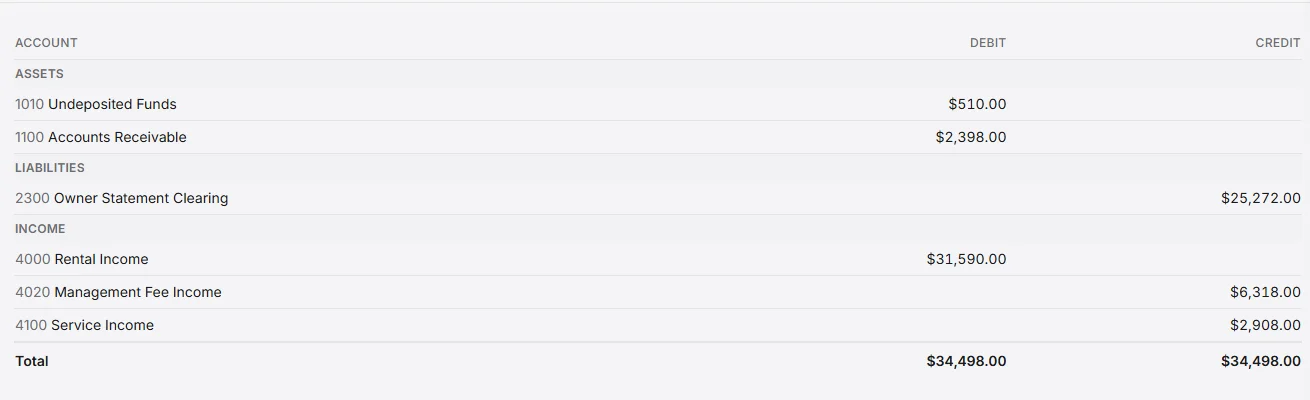
When an invoice or bill changes, VacayOps writes the accounting entry for you. Your P&L, balance sheet and other reports come straight from those entries — nothing to import or rebuild.
- Trial balance, P&L, balance sheet, cash flow, general ledger and tax — straight from the ledger
- Close a month to block back-dated posting; lock it permanently after filing
The records and checks your accountant needs
Invite your accountant as a user with the Accounting role, or give their software a read-only API token scoped to what they need — the books, issued owner statements and/or trust balances. Revoke a token any time; every token created or revoked is logged. Tokens can read, never write.
- The secret is shown once and stored only as a hash
- An OpenAPI reference your accountant’s tools can read
- 1099-NEC for contractors and 1099-MISC rents for owners — rents go to whoever owned the property at each stay’s check-in, split among co-owners
- CSV files laid out for the IRS IRIS portal (tax year 2025 columns): you review and upload — VacayOps does not e-file
- TINs are never stored in full — only the last four digits
Accountant access
1099 files · tax year 2025
You review and upload to IRIS. VacayOps does not e-file.
Owners approve the work before you bill it
Send an estimate; the owner accepts it in their portal or from a secure magic link — no account needed. Accepted estimates convert to invoices in one click. Unanswered ones expire on their own.
- Full acceptance trail: who approved, when, and how — declines capture a reason
- Recurring charges, weekly through annual, add themselves as invoice line items
- Per-rule owner rates for cleaning, labor, linens, and amenities — pulled from the pricing engine
- Short-stay two-tier cleaning rates: stays at or under your night threshold bill at their own rate, automatically
EST-2026-018 · Deck repair
AcceptedTwo-way QuickBooks. One-click pay links.
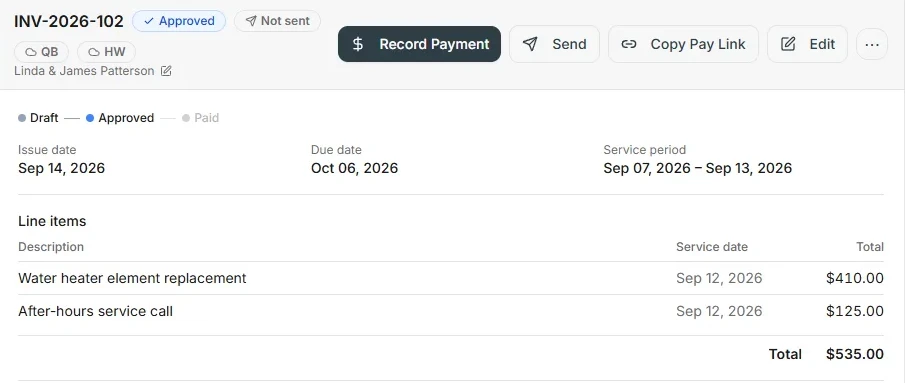
Push invoices and vendor bills to QuickBooks; pull your chart of accounts, items, and P&L back. When an owner owes you, send a direct pay link — they pay by card through your Stripe account without logging into anything.
- Invoices and bills sync to QuickBooks on demand, with the QB ID pinned to the record
- Tokenized pay links you can regenerate or revoke at any time
- Batch-create a month of owner invoices across the whole portfolio in one pass
The whole back office, one login
Included in the subscription — no per-seat fees, unlimited users. Each plan gets the parts its business uses.
Bills & payables
Bills tracked through draft, approved, paid, and overdue — each posting its own ledger entries.
Invoice aging
See which owners are past due and how far — before it becomes a collections problem.
Cost to Serve
Net operating margin and cost-per-clean per property, computed from your own dispatch records.
Period close
Closed months reject back-dated entries. Locked months can never be reopened. Your books stay filed.
Sales & lodging tax
Tax accrues to its own liability account as it posts; the tax reports show what was collected and who is responsible for filing it.
Year-End Tax Pack
For property owners: revenue, lodging tax and Schedule E expenses per property — the packet for your accountant.
Business Tax Summary
For service providers: income by service, costs by category and 1099-NEC payees for the year.
QuickBooks Online
Invoices and bills sync across, each line tagged to its property, for an accountant who works in QuickBooks.
Your money stays in your bank
VacayOps records and reconciles the money in your own bank and processor accounts. It never holds or moves funds. You pay owners from your own bank, and VacayOps records each payout against the owner's balance.
Trust rules come from your state and your license. VacayOps gives you and your accountant or broker the records, checks and signed reconciliations to work from; meeting those rules and making your filings stay with you.
Questions about the money
- Is accounting an add-on?
- No. Accounting is part of the subscription — no add-on fee for trust accounting, owner statements, accountant access or the 1099 files. Owner statements and trust accounting are part of the Full Platform ($29/property/month), because they are for companies that manage other people’s properties. Trust accounting is often bought as an add-on or a separate tool connected to your PMS. In VacayOps it’s part of the Full Platform, on the same bookings and owner statements.
- Does VacayOps hold or pay out my owners’ money?
- No. VacayOps records and reconciles the money in your own bank and processor accounts. It never holds or moves funds. You pay owners from your own bank — VacayOps gives you the payout list and records each payout against the owner’s balance.
- We’re on another system today. How do we switch?
- Switching is built in — a self-guided Migration Center, with a specialist reviewing your move. The move brings your properties, owners and upcoming reservations across, and brings your owner balances across too, so your first VacayOps owner statement starts from the right number. No setup fee — onboarding, setup, configuration and training included.
- What changes for my bookkeeper or accountant?
- Invite them as a user with the Accounting role, or give their software a read-only API token. (The Accounting role can’t open the Trust or API Access screens — those stay with your admins.) Each month you can hand them the three-way reconciliation PDF, with its sign-off lines; if they work in QuickBooks Online, invoices and bills sync across.
- What happens when a booking changes after the statement went out?
- Regenerate the month and VacayOps creates an adjustment statement — “Adjustment 1”, “Adjustment 2” — for the difference only. The issued statement is never rewritten. Adjustments are reviewed, issued, posted to the books and shown in the owner portal like any other statement.
- Do I still need QuickBooks?
- Not to keep your books — the ledger, month-end close, owner statements and reports live in VacayOps. If your accountant works in QuickBooks Online, invoices and bills sync across and your chart of accounts and P&L come back.
- Does VacayOps file my 1099s?
- No. The 1099 report builds 1099-NEC (contractors) and 1099-MISC rents (owners) and produces CSV files laid out for the IRS IRIS portal. You or your accountant review them and upload them. VacayOps keeps only the last four digits of a TIN.
- Can my bank connect directly?
- Import statements from any bank as CSV, OFX or QFX. US bank accounts can also be linked through Stripe Financial Connections. Either way, suggested matches line up bank lines with the books, and anything the matcher can’t place you match by hand.
Not another PMS. The vacation rental ecosystem.
One login. One bill. Unlimited users. Priced per property. No seat fees, no setup fee, no contract, and no booking fee on your direct site. 14-day free trial — no charge until it ends.