Switching PMS is a nightmare. So we built the Migration Center.
Migration is the reason managers stay on software they have outgrown. The Migration Center is in your account from day one: it reads your old system’s exports, shows exactly what will change before anything is saved, runs both systems side by side so your guests notice nothing, checks every booking against your old system, and switches over on the day you pick.
You stay in control, and you are never on your own: a VacayOps specialist joins a kickoff call and reviews your move before you switch. No setup fee — onboarding, setup, configuration and training included.
Built by operators who managed 200+ vacation rentals.
How the switch works
The Migration Center opens in your account the day you sign up — these are its real screens.
1 · Your plan
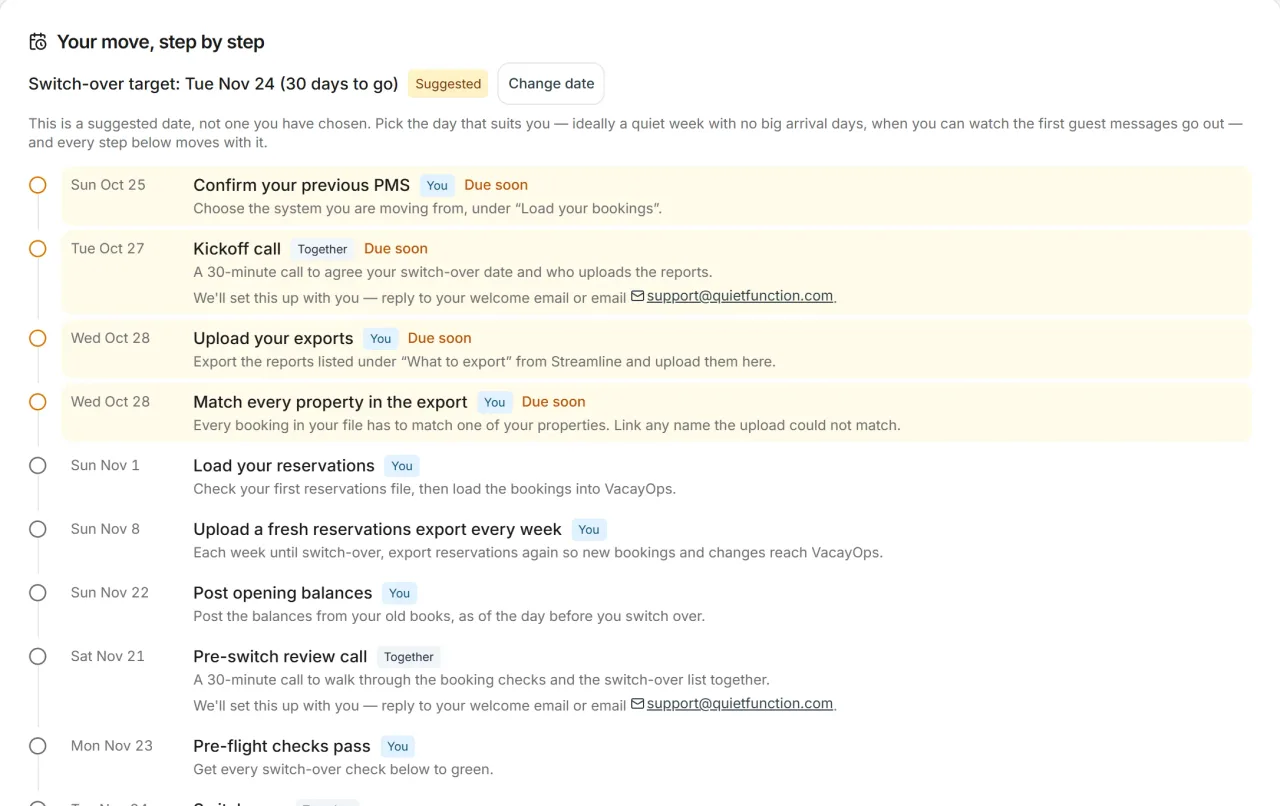
A plan with your date on it
The Migration Center lays the move out day by day — a 30-day plan to start, moved to whatever switch-over date suits you. A VacayOps specialist joins a kickoff call to agree it, and a pre-switch review call before you go live.
Swipe to see the whole screen →
2 · Your exports
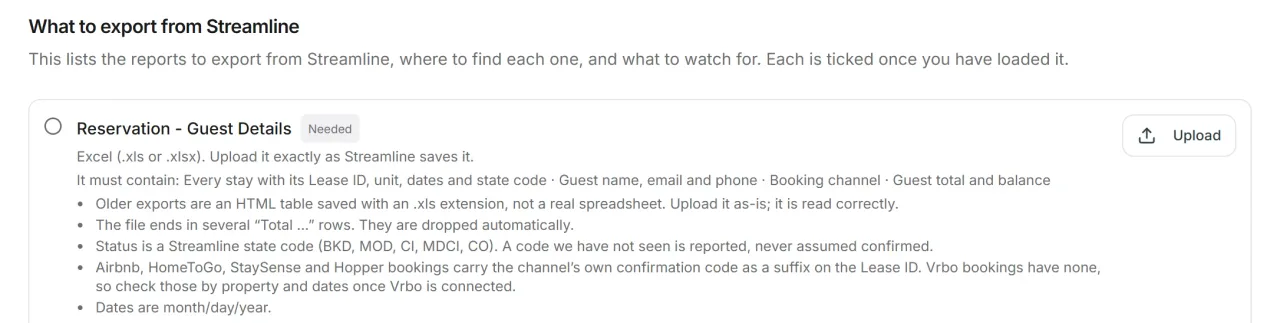
It tells you exactly what to export
Step-by-step export guides for Streamline, Guesty, Hostaway, OwnerRez, Escapia, Track and Hospitable — and a general guide for any other system or spreadsheet. Not sure what a file is? Drop it in: the Migration Center recognises the report, maps its columns and asks you about anything it can't match.
Swipe to see the whole screen →
3 · The parallel run
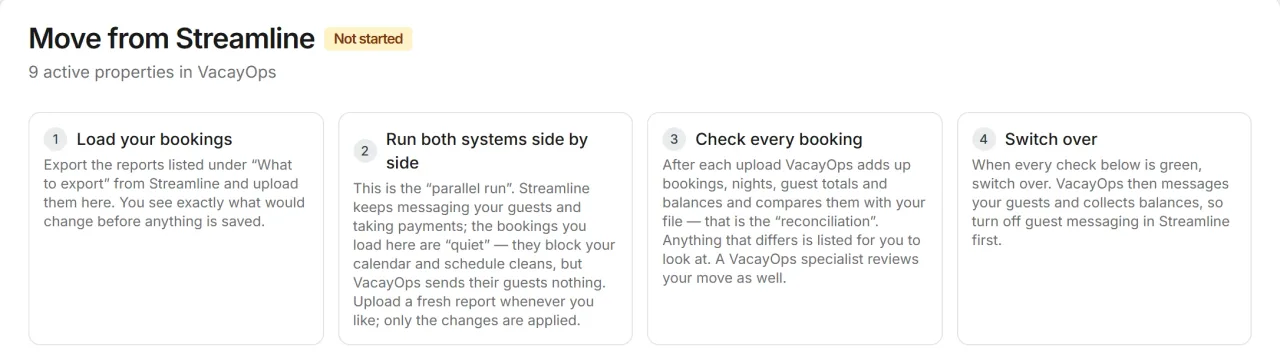
Nothing changes until you say so
Every upload shows what it would create, update or cancel before anything is saved. Then both systems run side by side: your bookings block the calendar and schedule the cleans in VacayOps, while your old system keeps messaging guests and taking payments. Upload a fresh export whenever you like — only the changes are applied, and edits you made in VacayOps are kept.
Swipe to see the whole screen →
4 · Before you switch
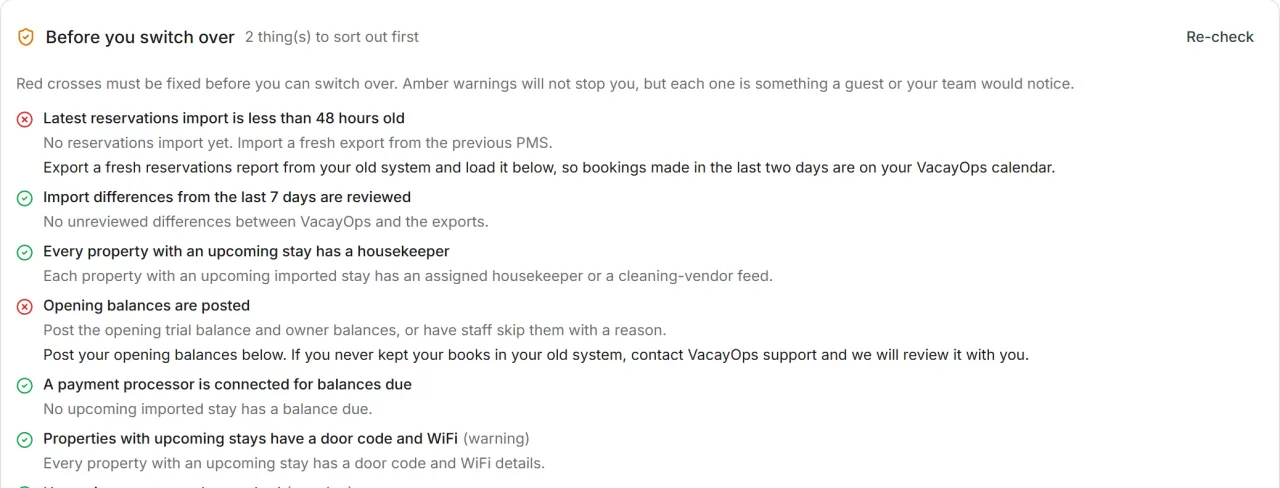
Every booking checked, then pre-flight
Each upload is compared with your file — bookings, nights, guest totals and balances — and anything that differs is listed for you. The switch-over button stays locked until the pre-flight checks are green: a fresh import, differences reviewed, a housekeeper on every property with a stay, opening balances posted.
Swipe to see the whole screen →
What comes across
The records your business runs on, not a blank account to fill in by hand — through the Migration Center, the Setup Guide's imports and your channel connection.
Reservations and guests
Past and upcoming stays from your export — guest name, email, phone, adults, children and pets, channel, and the money as your export itemizes it. Guest profiles build from them.
Airbnb and Booking.com listings
Through the channel manager, pull in each listing’s name, rooms and beds, descriptions, photos, amenities, fees, cancellation policy and check-in times — the same listing, so its reviews stay on it.
Channel bookings, counted once
Once your channels are connected, each booking they deliver is matched to the stay you imported by its confirmation code and takes it over — one copy, not two.
Properties, the way your team knows them
Addresses, beds and baths, door, gate and lockbox codes, WiFi, bed and linen counts, guest-supply counts, cleaning time and housekeeping notes.
Owners, team and vendors
Owners linked to their properties, team members invited to sign in, and your vendors with their categories — from your old system’s lists or any spreadsheet.
Task history and open jobs
Past and scheduled cleans, inspections and maintenance — property, date, status, who did it and the notes — plus your cleaning rates.
Opening balances and old statements
Your trial balance and each owner’s balance as of switch-over, and old owner statements uploaded as files that owners see in their portal.
CRM contacts and your website
Owner leads with their pipeline stage and source — and your existing website pages, imported as drafts with redirects so old links keep working.
What stays behind
Said plainly, so nothing surprises you on switch-over day.
- Guest message history — it stays in your old system and on the channels
- Saved guest cards — guests pay through your own processor from switch-over
- Daily rate calendars — set prices with rate rules or PriceLabs, or send us your revenue manager’s export and we load it
- Vrbo listing content — enter it once in VacayOps; Airbnb and Booking.com content imports directly
- Photos, checklists and time records on past jobs — the job history comes across, its attachments don’t
- Review text — reviews stay on the channel listing, where guests read them
What it costs to switch: nothing extra
The Full Platform is $29/property/month, in place of a $30–45/property/month standalone PMS and the subscriptions around it. The Migration Center is included.
- No setup fee — onboarding, setup, configuration and training included.
- No contract — month to month, 30 days' notice.
- 14-day free trial — no charge until it ends.
- Your price is locked for the first 12 months.
- No seat fees — every cleaner, inspector and office hire included.
Run your own numbers
Enter your portfolio size and what you pay your PMS today — here's what the bill looks like when it's one bill.
What does your software stack cost?
A standalone PMS typically runs $30–45/property/month — and it is rarely the only subscription.
Per-seat tools grow with your team. VacayOps users are unlimited.
What you pay for today — untick anything you don't
Property Management System
$30–45/property/mo typical
Reservations, rates & availability, direct channel connections, guest messaging, and reviews — native to the same platform that runs your operations, not synced into it.
Set by your PMS inputs$950/mo
$20–100/mo typical
Full AI assistant, auto-responses, daily briefings, property health scoring, and revenue estimator.
Your bill today$60/mo
$50–500/mo typical
Sales pipeline, owner contacts, lead tracking, digital agreements, and onboarding workflows.
Your bill today$150/mo
$15–50/mo typical
Drag-and-drop editor, direct booking engine, SEO tools, blog, and multi-market sites.
Your bill today$30/mo
$10–20/property/mo typical
Auto-scheduling from reservations, photo checklists, inspections, maintenance tracking, and smart task bundling.
Your bill today$375/mo
$30+/user/mo typical
Business VoIP with call trees, number porting, voicemail-to-email, and recorded, searchable calls. VacayOps: $7/line, unlimited users — 2 lines beat 5 seats.
Your bill today$150/mo
$7–15/user/mo typical
Unified inbox — SMS, email, recorded phone calls, live chat, plus Slack and Teams integration.
Your bill today$50/mo
$20–100/mo typical
Campaigns, audiences, guest WiFi email capture, and repeat-guest lifecycle offers.
Your bill today$50/mo
$12–16/unit/mo typical
Guest door codes per reservation, thermostat setbacks at checkout, and device health — no proprietary hub hardware. VacayOps: $5/device.
Your bill today$350/mo
$20–100/mo typical
P&L reports, revenue forecasting, booking pace, cost-to-serve, and anomaly detection.
Your bill today$60/mo
Market-data pricing (PriceLabs)
Optionalfrom $19.99/listing/mo
Rule-based rate automation is already included — seasons, day-of-week, last-minute windows, orphan nights and a cost floor. What it can't see is the market: no comp set, no forward occupancy. If you want that read, PriceLabs plugs in natively and owns the rates on the properties you point at it.
More options — booking fees on your direct bookings
Your stack today
- PMS: 25 properties × $38$950
- AI Tools$60
- CRM & Sales$150
- Website Builder$30
- Operations Platform$375
- Phone System$150
- Team Messaging$50
- Email Marketing$50
- Smart Home Platform$350
- Reporting Tools$60
- + your pricing engine (from $19.99/listing/mo)not counted
Total$2,225/mo
VacayOps Full Platform
- 25 properties × $29 — PMS and every included tool$725
- + 2 phone lines × $7$14
- + 25 devices × $5$125
- + direct booking fees$0
- + Vrbo, Booking.com and Expedia payments (0.5%, at cost)not counted
- + rate rules, included$0
Total$864/mo
You keep
$1,361/mo
$16,332 a year
Tool costs are typical mid-range figures — untick anything you don't pay for. A phone system or smart-home platform you tick is counted on both sides: its typical bill today, and VacayOps' $7/line and $5/device add-ons for the lines and devices you enter. Card processing is left out of both columns: you pay your processor either way. Also left out: our payment partner's fee (currently 0.5%) on Vrbo, Booking.com and Expedia payments, which VacayOps passes through at cost with no markup — it depends on your channel revenue. Airbnb payouts and direct bookings carry no VacayOps fee. Your pricing subscription goes to $0 on top of it, and we deliberately don't put a number on that: engines volume-discount from the second listing and some bill a percentage of booking revenue, so any figure we invented would be wrong in your favour. Pull your last invoice — that whole line is the extra saving. Rate rules price each property you leave on them; a property you connect to PriceLabs keeps PriceLabs' rates.
Questions about switching
- How long does switching PMS take?
- The Migration Center lays the move out day by day — a 30-day plan to start, moved to whatever switch-over date suits you. A VacayOps specialist joins a kickoff call to agree the plan and a pre-switch review call before you go live. The switch-over button stays locked until the pre-flight checks are green, so the date is yours but the checks come first.
- What moves from my old PMS?
- Past and upcoming reservations with guest details and the money as your export itemizes it, properties and their access codes and housekeeping details, owners, team and vendors, task history, opening balances, old owner statements as files, CRM contacts and your website pages. Airbnb and Booking.com listing content comes in through the channel manager. Guest message history, saved cards, rate calendars, Vrbo listing content and review text stay behind.
- Do I lose my reviews when I switch PMS?
- No. Reviews are not migrated — they stay on the channel listing, where guests read them. When you connect your existing Airbnb or Booking.com listing to VacayOps, it is the same listing, so its reviews stay with it. Once connected, reviews from your channels are collected in VacayOps with the stay attached.
- Do I have to stop using my old system right away?
- No. Both systems run side by side: your bookings block the calendar and schedule the cleans in VacayOps, while your old system keeps messaging guests and taking payments. There is no live connection between the two — upload a fresh export whenever you like and only the changes are applied. You switch over on the day you pick.
- Is there a fee to switch to VacayOps?
- No. No setup fee — onboarding, setup, configuration and training included. The Migration Center is part of the subscription — the Full Platform is $29/property/month. No contract — month to month, 30 days' notice. 14-day free trial — no charge until it ends.
- Which systems can I move from?
- The Migration Center has step-by-step export guides for Streamline, Guesty, Hostaway, OwnerRez, Escapia, Track and Hospitable, and a general guide for any other system or spreadsheet. It works from your old system’s exports, not a connection to it. Not sure what a file is? Drop it in: it recognises the report, maps its columns and asks you about anything it can’t match.
See it for yourself
How the channel manager works
Direct connections to Airbnb, Vrbo, Booking.com, Expedia, Google Vacation Rentals, and Hopper — listings, rates, and reservations distributed from the property record.
See the channel managerComparing systems?
See how VacayOps compares to Guesty, Hostaway, Escapia and others — capability by capability, invoice by invoice.
Compare VacayOpsThe whole price, in one place
One per-property base rate with exactly two published add-ons. No booking fee on your direct site and no channel-manager fee; Vrbo, Booking.com and Expedia payments carry our payment partner’s 0.5%, passed through at cost.
See pricingThe move you've been putting off, laid out step by step.
Start a trial and the Migration Center opens with your account — or book a walkthrough and we'll plan the move with you. 14-day free trial — no charge until it ends.