Vacation rental inspection forms & checklistsA failed inspection item shouldn’t need a phone call. It should create the work order.
Build any form by drag-and-drop, or hand the AI your county’s inspection PDF and get it back as a working form. Attach it to the clean, the inspection or the repair; require the photos; and let a single Fail answer create the task, notify the manager and text the crew. Owners, contractors and guests fill theirs from a link. Included on every plan.
Unlimited users. No per-form, per-inspection or per-seat fee.
Upload the county’s inspection PDF. Get a working digital form.
Sevier County’s fire marshal, Bay County’s self-inspection survey, the Scottish Fire and Rescue short-term-let checklist — every jurisdiction hands you a paper form, and someone retypes it. Here you upload it. The AI rebuilds it as a blank, reusable form: every section in order, each Pass/Fail/N/A item as a dropdown with photo evidence switched on, code citations kept under the question, one Remarks box per section, and a list of anything it could not place.
- PDF, Word (.docx) or a photo of the paper form, up to 10 MB
- A filled-in copy works: the answers are stripped, the questions kept
- The draft lands in the builder, so you change what you like before you save
- The only document-to-form inside a vacation rental PMS (checked 27 Oct 2026)
Fire marshal inspection · PDF → form
Ready to reviewSections in the original order. Code citations kept under each question. Anything it could not place is listed for you.
Fifteen field types, conditions, repeating rooms — or one sentence to the AI
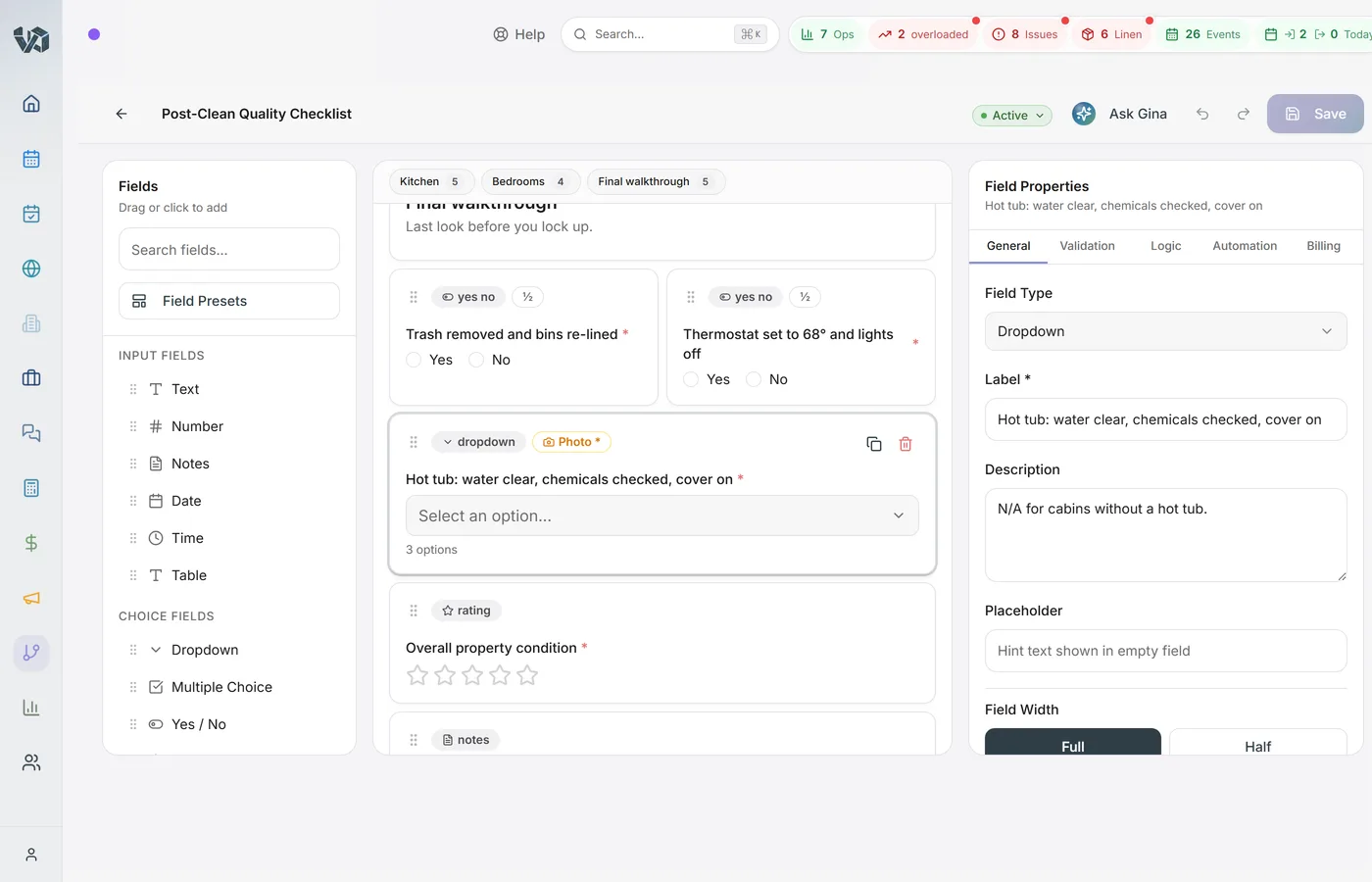
Describe the form in plain English and the AI drafts it, fields, options and required flags included; describe a change and it adjusts what you have. Or build it yourself: the library has text, number, notes, date, time, dropdown, multiple choice, yes/no, rating, checkbox, table, photo, section header, divider and repeating group, with one-click presets for the common blocks.
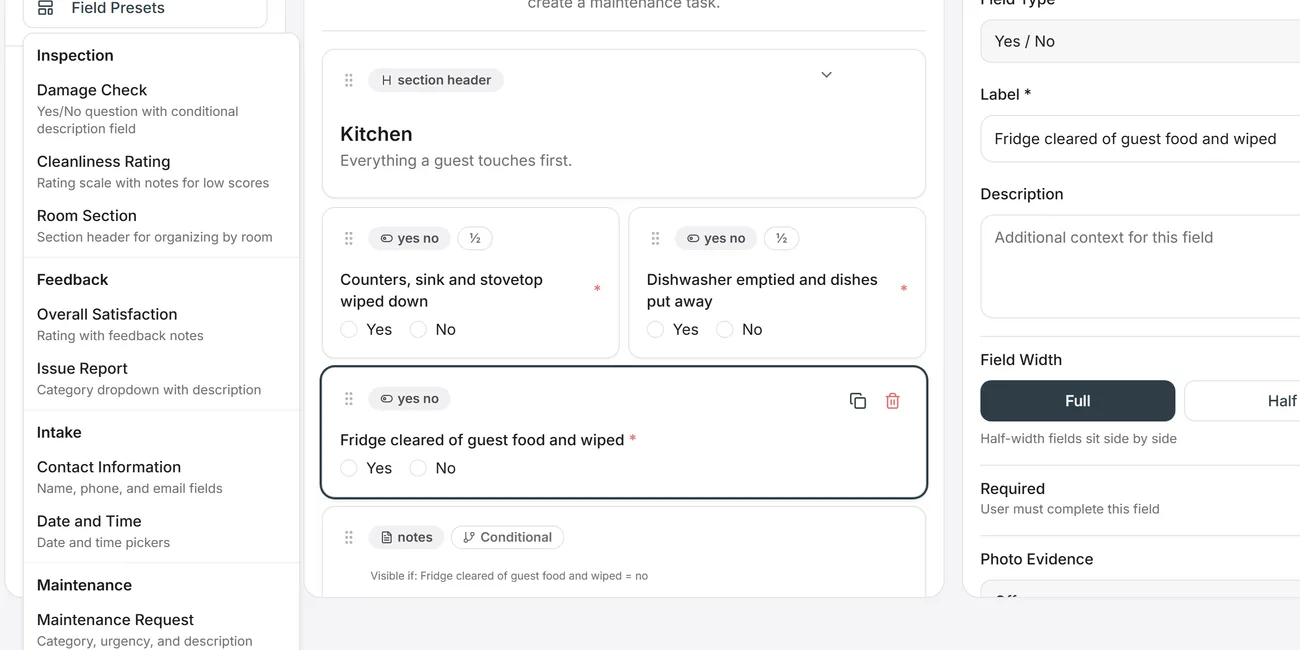
- Show a field only when an answer matches — up to several rules per field, with and/or, seven operators; a whole section can hide the same way
- Repeat a block per bedroom or per bathroom, from the property’s own counts
- Photo fields with a minimum count; photo evidence on any question
- Tables with typed columns, ratings out of 3, 5 or 10, presets for damage checks, cleanliness ratings and issue reports
- Preview as the person filling it in, with 50 steps of undo behind you
The form rides on the clean, and the clean can’t close without it
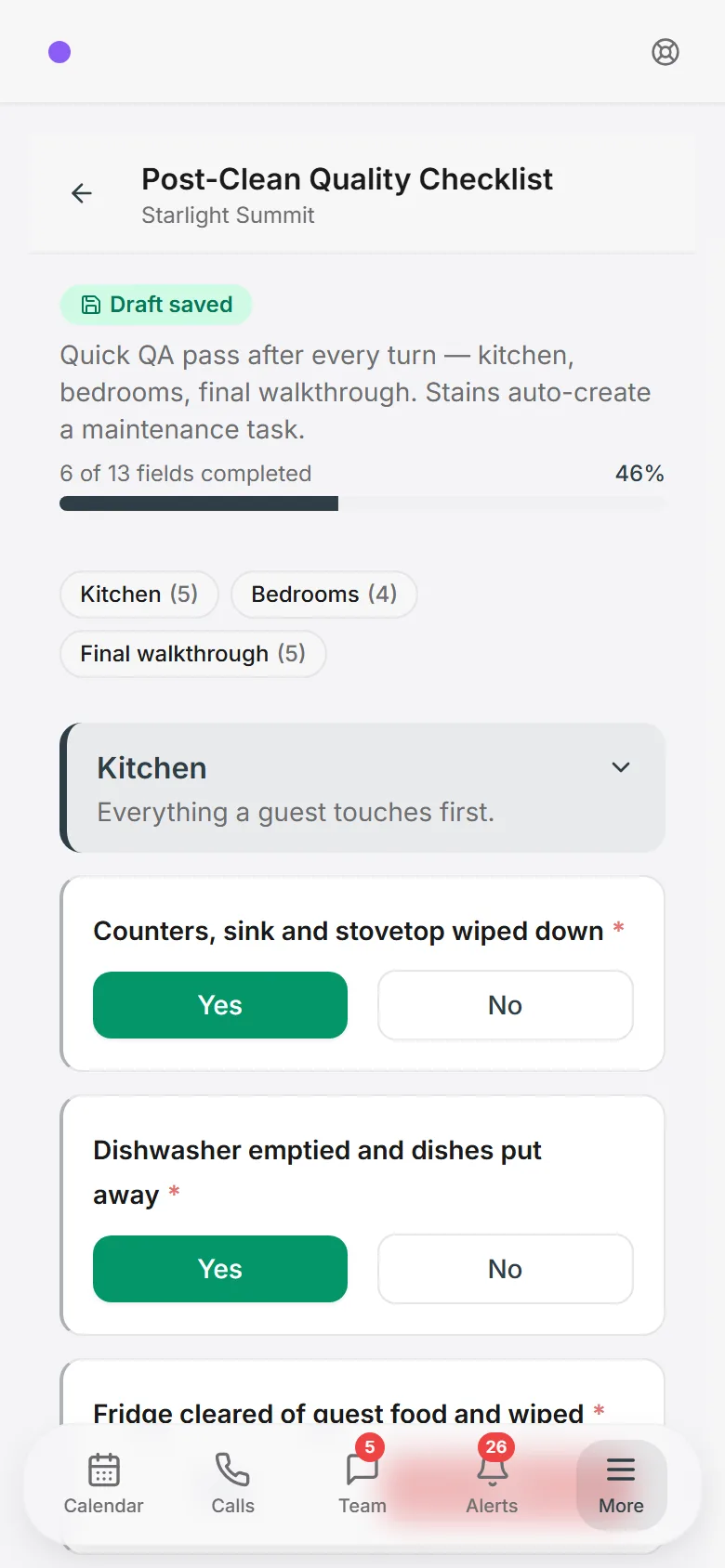
Link a form to a task type once. Every auto-scheduled turnover, recurring task and scheduled inspection arrives with it attached, the housekeeper fills it on the phone in the middle of the job, and the task cannot be marked complete until the form is in. Contractors without an account get it through a task share link.
- Drafts save as the cleaner goes and pick up on another device
- Photos taken without signal queue on the phone and upload when it reconnects; Submit waits for them
- Spanish-speaking staff see every label in Spanish; the answers stay in English for your reports
- Works in the Android field app and in the phone’s browser. The VacayOps app for field teams is on Google Play for Android. The iPhone app is coming soon; until then, crews and managers use the browser and add it to the home screen.
One answer starts the workflow
On the form, any question can create a task when its answer matches: “Damage found? Yes” makes a maintenance task on that property, assigned to your handyman, due on the next departure. In Workflows, “Form submitted” and “Form answer matches” are triggers like a checkout or an overdue task, with twelve operators, branches and delays. The form-created task and the workflow-created task never duplicate.
- Trigger on the form, the task type, and the exact answer
- Create the re-inspection, notify the manager in the app and by SMS, text the crew only if a guest is arriving
- Every run is on the record: what fired, what ran, what was skipped and why
- WhenForm answer matches — “Extinguisher tagged within a year” is Fail
- ThenCreate task — Replace extinguisher, Maintenance, high priority
- ThenNotify the property manager (app + SMS)
- Only ifA guest arrives within 48 hours
- ThenText the on-call technician
Built by the person who runs the crews. No connector, no per-task fee, no developer.
Owners, contractors and guests fill theirs from a link
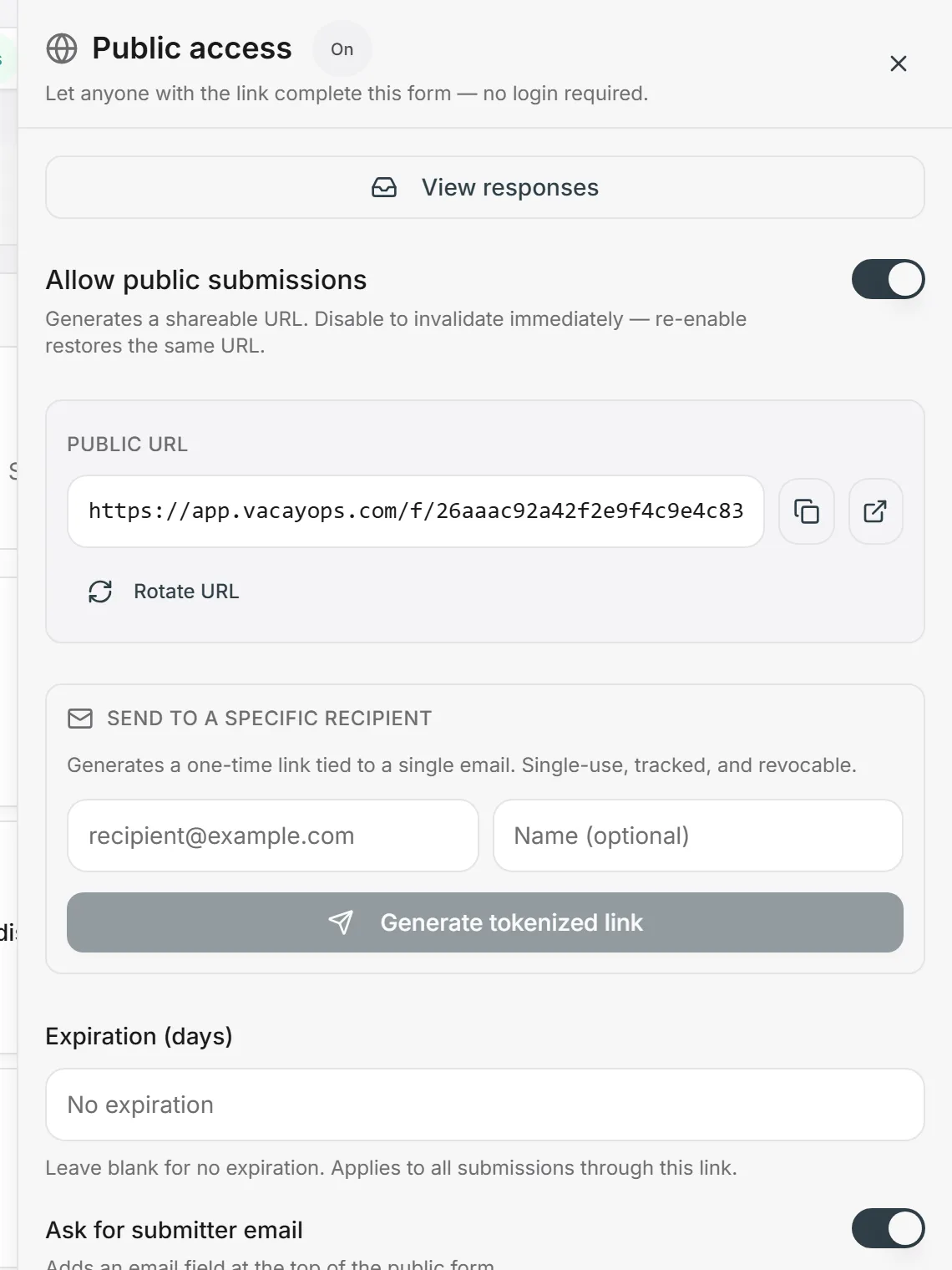
Turn on a public link and the form is live, on a page carrying your logo and colours, no login. Set an expiry, capture the submitter’s email, allow one response per email, require a captcha, write the thank-you message or send them to a page, and notify up to twenty people on every submission. For a named recipient, mint a single-use link instead — tracked, expiring, revocable.
- Public links you can switch off in a click and rotate without rebuilding the form
- Single-use links by the batch, each with its own status: pending, completed, expired, revoked
- An automation email carries a form link that mints one tracked link per recipient
- Rate limiting and an activity log for every blocked attempt
Responses, share links and activity, in one place
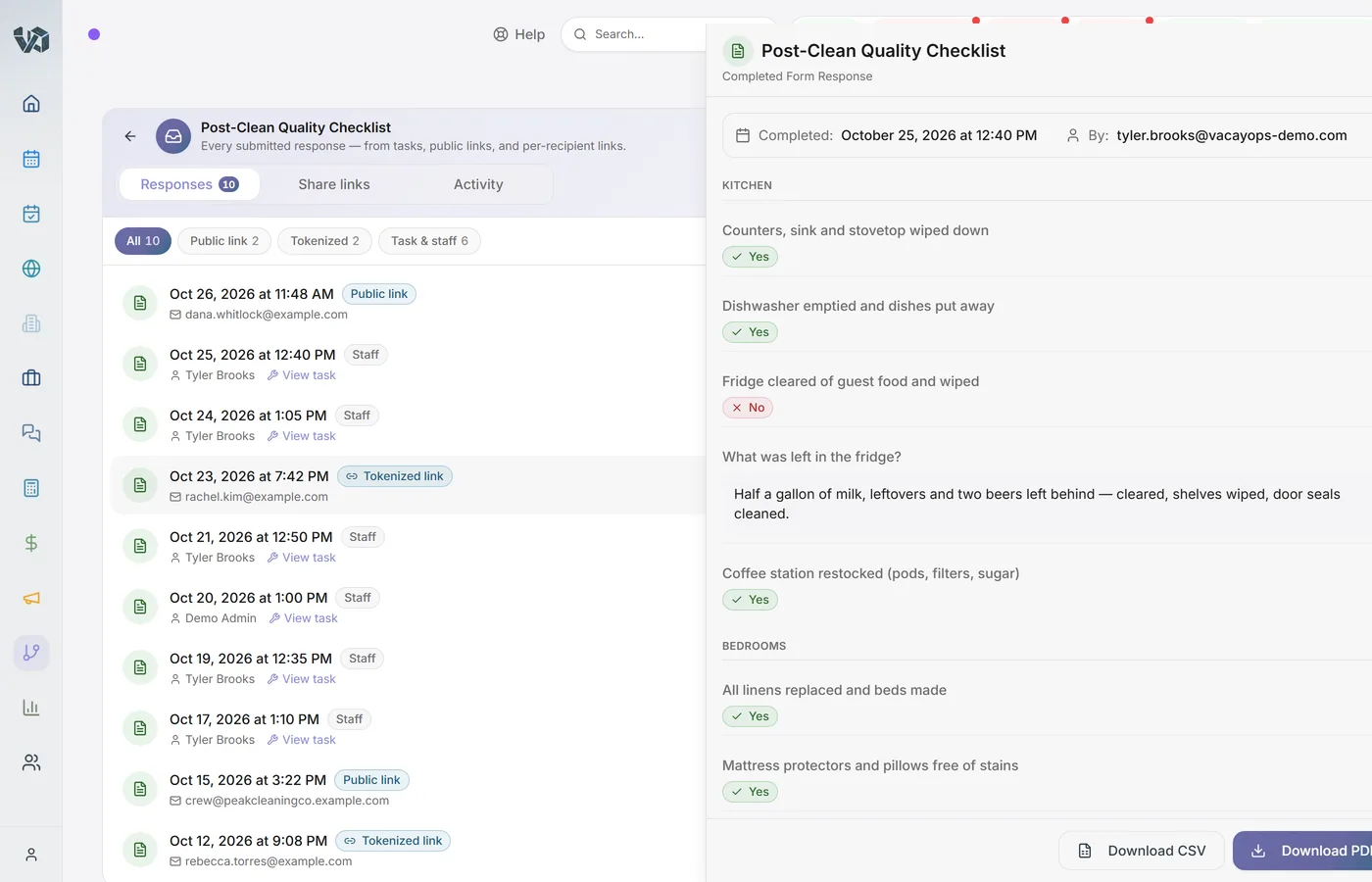
Each form keeps its responses with who submitted, from where — a task, a public link or a single-use link — and which task it belongs to. Open one and export it as a PDF with the photos inline and a photo appendix, the document you hand to the fire marshal or send to the owner. Export one response or all of them as CSV, table rows included.
- Filter by source: staff and tasks, public, or single-use links
- The Share links tab shows who has answered and who has not
- The Activity tab shows captcha failures, rate limits, duplicates and expired links
- A new submission notifies the form’s owner and opens straight from the notification
Checklist apps build checklists. Form tools don’t know what a turnover is.
The vacation rental checklist apps stop at hand-built checklists on a task. The general form tools can read a PDF and fire a follow-up, but they have no properties, no reservations and no cleaning task to attach the form to, and they charge per user. The form builder here does both, on the same record as the booking, the task and the owner statement.
- Named comparisons with the pages we checked and the dates are on /compare
- What we do not have, said plainly: AI review of the cleaner’s photos (Properly), and an offline mode for the whole form (Breezeway)
Who does what, checked 27 Oct 2026
Breezeway, Turno, Properly, Hostaway, Guesty, Hostfully, Track, Streamline
Checklists you build by hand. None markets rebuilding a form from a PDF or Word file. Properly builds a checklist from a walkthrough video.
Jotform, GoCanvas, Mitti (ex-SafetyCulture)
PDF-to-form, and a Fail can trigger a follow-up — but no reservations, no properties, no cleaning task to attach it to, and priced per user.
VacayOps
Both, inside the PMS: the form is built from your PDF, rides on the clean, gates the task, and a Fail starts the workflow. Included, unlimited users.
“Not marketed” means we read their product pages and found no such feature; the pages and dates are on each comparison.
From the inspector’s PDF to a closed work order
- 1
Upload or describe
Drop the PDF, the Word file or a photo of the paper form on the AI, or describe the form in a sentence.
- 2
Review the draft in the builder
Sections, dropdowns, photo evidence and citations are already there. Change what you like, preview it, save.
- 3
Attach it to the task type
Every scheduled clean, inspection or repair of that type arrives with the form on it, and cannot close without it.
- 4
The crew fills it on the phone
Required answers, required photos, Spanish labels for Spanish-speaking staff, drafts that survive a dead battery.
- 5
A Fail creates the work order
The answer creates the task, notifies the manager and texts the crew. The PDF with photos is one click, and the run is on the record.
What forms cover
Included on every plan at $29/property/month. Unlimited users. No per-form, per-inspection or per-seat fee.
Document to form
PDF, Word or a photo of the paper form, up to 10 MB, rebuilt as a blank reusable form with Pass/Fail/N/A and photo evidence.
Describe it to the AI
A sentence becomes a draft with fields, options and required flags. Describe a change and it adjusts the form you have.
15 field types, conditions, repeating rooms
Tables, ratings, photos, dropdowns and more; show a field or a section on an answer; repeat a block per bedroom or bathroom.
Photo proof that gates the task
Minimum photo counts and photo evidence per question. The task cannot close until the form is in. Photos queue offline.
Public and single-use links
Expiry, email capture, captcha, one per email, notifications, branding. Single-use links by the batch, tracked on the form.
Triggers, tasks and exports
Form submitted and Form answer matches as workflow triggers; auto-task from an answer; PDF with photos and CSV out.
Forms, checklists and inspections: questions
- Can I turn my county’s short-term rental inspection PDF into a digital form?
- Yes. Upload the PDF — Sevier County’s fire marshal inspection, Bay County’s self-inspection survey, the Scottish Fire and Rescue short-term-let checklist, whatever your jurisdiction hands you — and the AI rebuilds it as a blank, reusable form: sections in the original order, each Pass/Fail/N/A item as a dropdown with photo evidence switched on, code citations kept under the question, a Remarks box per section, and a short list of anything it could not place. You review it in the builder, change what you like and save.
- Does the AI need a template, or can I just describe the form?
- Describe it. “A departure-clean checklist for a three-bedroom cabin with a hot tub, photos of every room, and a damage question that opens a photo field when the answer is yes” becomes a draft with fields, options and required flags. Describe a change and the AI adjusts the existing form instead of starting over.
- Which files can I upload?
- PDF, Word (.docx), or a photo of the paper form (PNG, JPG or WebP), up to 10 MB. A filled-in copy works too: the AI strips the answers and keeps the questions.
- Can a form require photos before a cleaner can finish the task?
- Yes. Photo fields take a minimum count, and any question can require photo evidence. A task with a form attached cannot be marked complete until the form is submitted, so the photos are on the record before the job closes.
- Can a failed inspection answer create a maintenance task or notify a manager?
- Yes, two ways. On the form itself, any question can create a task when its answer matches a condition — “Damage found? Yes” creates a maintenance task on that property, assigned to your handyman, due on the next departure. In Workflows, “Form submitted” and “Form answer matches” are triggers, so one Fail can create the re-inspection, notify the manager and text the crew, with branches and delays like any other workflow.
- Do forms work offline?
- Photos do: on the web filler, photos taken without signal queue on the phone and upload when it reconnects, and Submit waits for them. Submitting the form itself needs a connection. The VacayOps app for field teams is on Google Play for Android. The iPhone app is coming soon; until then, crews and managers use the browser and add it to the home screen.
- Can I export a completed inspection as a PDF with photos?
- Yes. Every response exports to a PDF with the photos inline and a photo appendix — the thing you hand the fire marshal or attach to the owner’s email. Responses also export to CSV, one or all of them at once, with table rows included.
- Can owners, contractors or guests fill out a form without a login?
- Yes. Any form can have a public link, with an expiry date, submitter email capture, one response per email, a captcha, a thank-you message or redirect, and up to 20 people notified on each submission. For a named recipient, mint a single-use link that expires and shows up on the form’s Share links tab as pending, completed or expired. Contractors without accounts fill task forms through a task share link. And an automation email can carry a form link that mints one tracked link per recipient.
- Does the form builder replace Breezeway, Turno or Properly?
- For checklists and inspections, yes: photo requirements, required answers, pass/fail items, inspections scheduled on the calendar, and a PDF at the end, all on the same task the cleaner is already working. Two things we do not do (checked 27 Oct 2026): Properly’s AI review of the cleaner’s photos, and Breezeway’s offline checklist mode — our photos queue offline, the form itself does not.
- Is there a free inspection or cleaning checklist I can start from?
- Yes: our vacation rental inspection checklist and cleaning checklist are free to download and print, and each one is a few minutes from being a form in your account — paste the items, or upload the printed copy and let the AI rebuild it.
- Is the form builder extra, or priced per user?
- Neither. Forms are included on every plan at the per-property price, and users are unlimited, so every cleaner, inspector and contractor can fill one without a seat fee. No setup fee — onboarding, setup, configuration and training included.
- Does it work in Spanish?
- For your crews, yes: a staff member whose language is set to Spanish sees every label and description translated automatically. The answers are stored in English, so your reports and PDFs read the same whoever filled the form.
Bring the form your inspector uses
In a 30-minute walkthrough we’ll upload it, rebuild it, attach it to a clean and fail an item on purpose. No setup fee — onboarding, setup, configuration and training included.